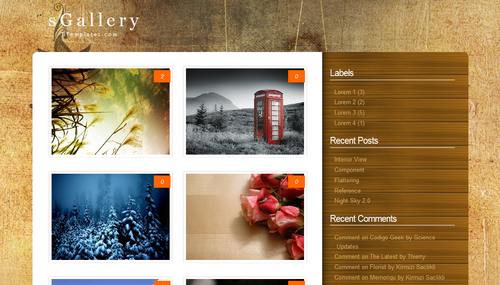
Template Photo Collection - Ane cuma mau berbagi aja. terutama buat sobat-sobat kampus ane..

For SS :
Lumayan nih buat nambah-nambah koleksi blog..

Apa lagi buat anak jurusan broadcast.
Nah untuk demo sobat klik Ini.
Nah kalau sobat mau, silahkan COPAS code dibawah ini aja ya.
<?xml version="1.0" encoding="UTF-8" ?>
<!DOCTYPE html PUBLIC "-//W3C//DTD XHTML 1.0 Strict//EN" "http://www.w3.org/TR/xhtml1/DTD/xhtml1-strict.dtd">
<html expr:dir='data:blog.languageDirection' xmlns='http://www.w3.org/1999/xhtml' xmlns:b='http://www.google.com/2005/gml/b' xmlns:data='http://www.google.com/2005/gml/data' xmlns:expr='http://www.google.com/2005/gml/expr'>
<head>
<b:include data='blog' name='all-head-content'/>
<title><data:blog.pageTitle/></title>
<b:skin><![CDATA[/*
-------------------------------------------------------------
Name : Hover Slide Effect with jQuery
URI : http://54mp3l.blogspot.com/
Author : Mas Awang and Oky
-------------------------------------------------------------- */
#navbar-iframe {
height:0px;
visibility:hidden;
display:none
}
*{
margin:0;
padding:0;
}
body{
background:#222;
font-family:Arial, Helvetica, sans-serif;
font-size:12px;
}
h1,h2{
font-weight:normal;
}
h2{
float:right;
margin-top:35px;
color:#999;
}
h1{
color:#777;
font-size:45px;
float:left;
margin:10px;
}
h3{
color:#777;
display:block;
clear:both;
font-weight:normal;
font-size:16px;
margin:10px;
font-style:italic;
text-align:center;
}
.content{
width:900px;
position:relative;
margin:20px auto 0px auto;
}
span.reference{
font-family:Arial;
text-align:center;
font-size:12px;
display:block;
margin-top:20px;
}
span.reference a{
color:#999;
text-transform:uppercase;
text-decoration:none;
margin-right:20px;
}
.hs_container{
position:relative;
width:902px;
height:471px;
overflow:hidden;
clear:both;
border:2px solid #fff;
cursor:pointer;
-moz-box-shadow:1px 1px 3px #222;
-webkit-box-shadow:1px 1px 3px #222;
box-shadow:1px 1px 3px #222;
}
.hs_container .hs_area{
position:absolute;
overflow:hidden;
}
.hs_area img{
position:absolute;
top:0px;
left:0px;
display:none;
}
.hs_area img.hs_visible{
display:block;
z-index:9999;
}
.hs_area1{
border-right:2px solid #fff;
}
.hs_area4, .hs_area5{
border-top:2px solid #fff;
}
.hs_area4{
border-right:2px solid #fff;
}
.hs_area3{
border-top:2px solid #fff;
}
.hs_area1{
width:449px;
height:334px;
top:0px;
left:0px;
}
.hs_area2{
width:451px;
height:165px;
top:0px;
left:451px;
}
.hs_area3{
width:451px;
height:167px;
top:165px;
left:451px;
}
.hs_area4{
width:192px;
height:135px;
top:334px;
left:0px;
}
.hs_area5{
width:708px;
height:135px;
top:334px;
left:194px;
}
</head>
<!-- end outer-wrapper -->
</style>
]]></b:skin>
<script src='http://blog.simpanglimo.com/demo/js/cufon-yui.js' type='text/javascript'/>
<script src='http://blog.simpanglimo.com/demo/js/Cantarell.font.js' type='text/javascript'/>
<script type='text/javascript'>
Cufon.replace('a,h3');
Cufon.replace('h1', {
textShadow: '0px 1px #fff'
});
Cufon.replace('h2', {
textShadow: '0px 1px #fff'
});
</script>
</head>
<body>
<div class='content'>
<h1>Blog</h1>
<h2>Hover Slide Effect with jQuery </h2>
<div class='hs_container' id='hs_container'>
<div class='hs_area hs_area1'>
<img alt='' class='hs_visible' src='http://blog.simpanglimo.com/demo/images/area1/1.jpg'/>
<img alt='' src='http://blog.simpanglimo.com/demo/images/area1/3.jpg'/>
</div>
<div class='hs_area hs_area2'>
<img alt='' class='hs_visible' src='http://blog.simpanglimo.com/demo/images/area2/1.jpg'/>
<img alt='' src='http://blog.simpanglimo.com/demo/images/area2/3.jpg'/>
</div>
<div class='hs_area hs_area3'>
<img alt='' class='hs_visible' src='http://blog.simpanglimo.com/demo/images/area3/1.jpg'/>
<img alt='' src='http://blog.simpanglimo.com/demo/images/area3/3.jpg'/>
</div>
<div class='hs_area hs_area4'>
<img alt='' class='hs_visible' src='http://blog.simpanglimo.com/demo/images/area4/1.jpg'/>
<img alt='' src='http://blog.simpanglimo.com/demo/images/area4/3.jpg'/>
</div>
<div class='hs_area hs_area5'>
<img alt='' class='hs_visible' src='http://blog.simpanglimo.com/demo/images/area5/1.jpg'/>
<img alt='' src='http://blog.simpanglimo.com/demo/images/area5/3.jpg'/>
</div>
</div>
<div>
<h3>arahkan kursor/mouse pada gambar atau klik salah satu gambar</h3>
<span class='reference'>
<a href='http://www.flickr.com/photos/tucia/' target='_blank'>Images by Tucia</a>
</span>
</div>
</div>
<!-- The JavaScript -->
<script src='http://ajax.googleapis.com/ajax/libs/jquery/1.4.3/jquery.min.js' type='text/javascript'/>
<script src='http://blog.simpanglimo.com/demo/js/jquery.easing.1.3.js' type='text/javascript'/>
<script type='text/javascript'>
$(function() {
//custom animations to use
//in the transitions
var animations = ['right','left','top','bottom','rightFade','leftFade','topFade','bottomFade'];
var total_anim = animations.length;
//just change this to one of your choice
var easeType = 'swing';
//the speed of each transition
var animSpeed = 450;
//caching
var $hs_container = $('#hs_container');
var $hs_areas = $hs_container.find('.hs_area');
//first preload all images
$hs_images = $hs_container.find('img');
var total_images = $hs_images.length;
var cnt = 0;
$hs_images.each(function(){
var $this = $(this);
$('<img/>').load(function(){
++cnt;
if(cnt == total_images){
$hs_areas.each(function(){
var $area = $(this);
//when the mouse enters the area we animate the current
//image (random animation from array animations),
//so that the next one gets visible.
//"over" is a flag indicating if we can animate
//an area or not (we don't want 2 animations
//at the same time for each area)
$area.data('over',true).bind('mouseenter',function(){
if($area.data('over')){
$area.data('over',false);
//how many images in this area?
var total = $area.children().length;
//visible image
var $current = $area.find('img:visible');
//index of visible image
var idx_current = $current.index();
//the next image that's going to be displayed.
//either the next one, or the first one if the current is the last
var $next = (idx_current == total-1) ? $area.children(':first') : $current.next();
//show next one (not yet visible)
$next.show();
//get a random animation
var anim = animations[Math.floor(Math.random()*total_anim)];
switch(anim){
//current slides out from the right
case 'right':
$current.animate({
'left':$current.width()+'px'
},
animSpeed,
easeType,
function(){
$current.hide().css({
'z-index' : '1',
'left' : '0px'
});
$next.css('z-index','9999');
$area.data('over',true);
});
break;
//current slides out from the left
case 'left':
$current.animate({
'left':-$current.width()+'px'
},
animSpeed,
easeType,
function(){
$current.hide().css({
'z-index' : '1',
'left' : '0px'
});
$next.css('z-index','9999');
$area.data('over',true);
});
break;
//current slides out from the top
case 'top':
$current.animate({
'top':-$current.height()+'px'
},
animSpeed,
easeType,
function(){
$current.hide().css({
'z-index' : '1',
'top' : '0px'
});
$next.css('z-index','9999');
$area.data('over',true);
});
break;
//current slides out from the bottom
case 'bottom':
$current.animate({
'top':$current.height()+'px'
},
animSpeed,
easeType,
function(){
$current.hide().css({
'z-index' : '1',
'top' : '0px'
});
$next.css('z-index','9999');
$area.data('over',true);
});
break;
//current slides out from the right and fades out
case 'rightFade':
$current.animate({
'left':$current.width()+'px',
'opacity':'0'
},
animSpeed,
easeType,
function(){
$current.hide().css({
'z-index' : '1',
'left' : '0px',
'opacity' : '1'
});
$next.css('z-index','9999');
$area.data('over',true);
});
break;
//current slides out from the left and fades out
case 'leftFade':
$current.animate({
'left':-$current.width()+'px','opacity':'0'
},
animSpeed,
easeType,
function(){
$current.hide().css({
'z-index' : '1',
'left' : '0px',
'opacity' : '1'
});
$next.css('z-index','9999');
$area.data('over',true);
});
break;
//current slides out from the top and fades out
case 'topFade':
$current.animate({
'top':-$current.height()+'px',
'opacity':'0'
},
animSpeed,
easeType,
function(){
$current.hide().css({
'z-index' : '1',
'top' : '0px',
'opacity' : '1'
});
$next.css('z-index','9999');
$area.data('over',true);
});
break;
//current slides out from the bottom and fades out
case 'bottomFade':
$current.animate({
'top':$current.height()+'px',
'opacity':'0'
},
animSpeed,
easeType,
function(){
$current.hide().css({
'z-index' : '1',
'top' : '0px',
'opacity' : '1'
});
$next.css('z-index','9999');
$area.data('over',true);
});
break;
default:
$current.animate({
'left':-$current.width()+'px'
},
animSpeed,
easeType,
function(){
$current.hide().css({
'z-index' : '1',
'left' : '0px'
});
$next.css('z-index','9999');
$area.data('over',true);
});
break;
}
}
});
});
//when clicking the hs_container all areas get slided
//(just for fun...you would probably want to enter the site
//or something similar)
$hs_container.bind('click',function(){
$hs_areas.trigger('mouseenter');
});
}
}).attr('src',$this.attr('src'));
});
});
</script>by
: <a href='http://www.facebook.com/ononeiki.blogspot' title='awang '>Awang Shellovers </a>
</body>
</html>
Untuk pemasangannya mungkin tak perlu dijelaskan lagi yah..
Dan untuk mengganti Imagenya, sobat cari code di bawah ini.
<div class='hs_container' id='hs_container'>
dan nanti dibawah code itu ada URL imagenya yg bisa sobat ganti.
Okey, mungkin itu aja dari ane.. selamat mencoba Template Photo Collection.